No more saying
“brush your teeth” 20 times.
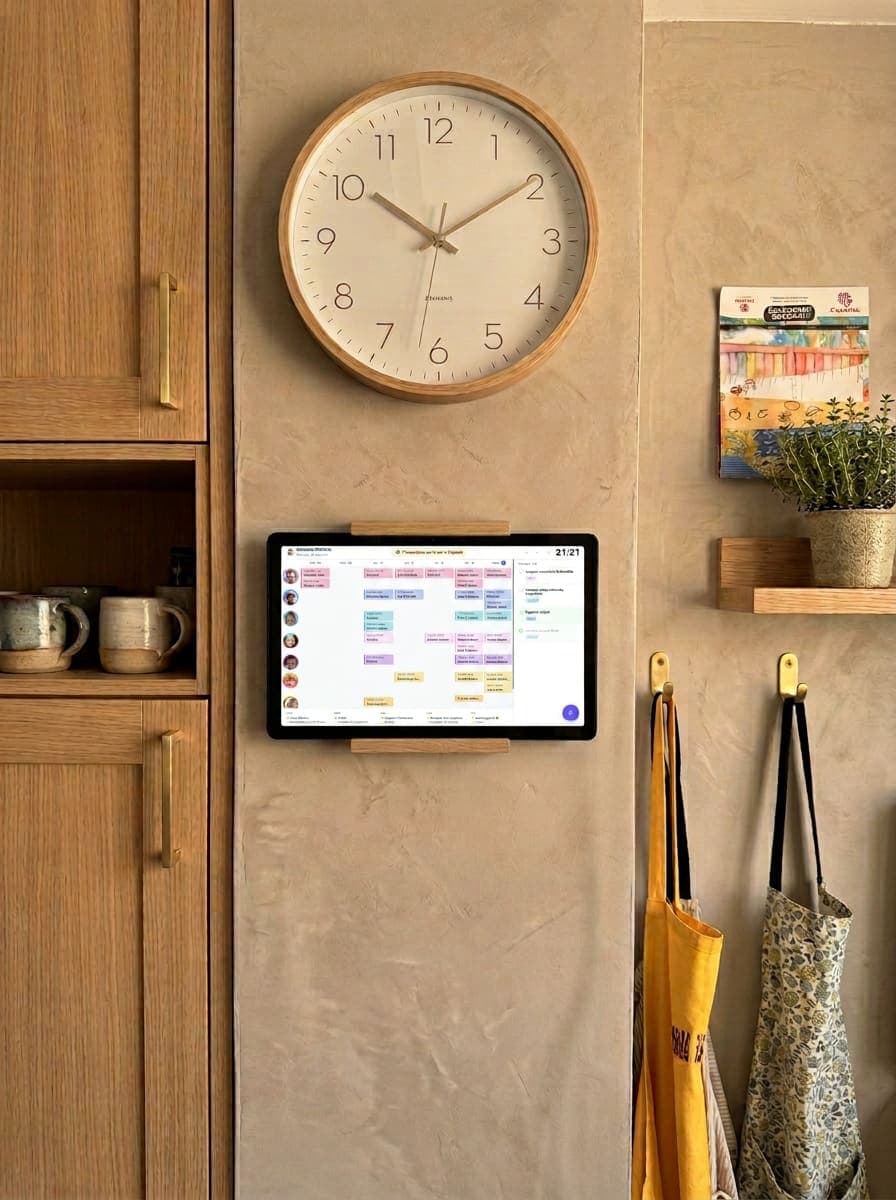
Routines, chores with stars and the school schedule on the kitchen tablet. Kids see what's next and tick it off themselves; you run it all from your phone.

Sound familiar?
Sticky notes on the fridge. Six calendars that never match. "Whose turn was it again?"
HeyFamily puts the whole household on one warm, glanceable screen. Everyone sees the same week, adds their own plans, and ticks things off — right there in the kitchen. No nagging, no app downloads, no fuss.
Everything in one place
One screen for the whole family
Shared family calendar
Every member gets their own column and colour. Add single-day, multi-day, or recurring events (daily, weekly, monthly, yearly) in seconds.
Stars & rewards
Turn chores and routines into a game: assign stars, earn them on completion, and redeem them for rewards you define.
AI-powered visual routines
Step-by-step sequences with icons kids complete on their own. Describe them in one sentence and let AI build them for you.
Weekly menu
Plan lunches and dinners Monday to Friday with your favourite dishes, or let AI suggest the week's menu.
Tasks & to-dos
Priority, assignment and recurrence. Marked done with confetti and sound right from the screen.
Notices & announcements
Highlighted messages with a start and expiry date for what really matters.
Shopping list
Real-time, with products and prices from your supermarket and the running total always in sight.
Weather forecast
Every day on the calendar shows its high and low temperature — no setup required.
Family screensaver
Family photos on a loop whenever the screen has been idle for a while.
The fun stuff
Built so the whole family wants to use it
It's not just a calendar — it's a small family game that motivates kids to do their chores and routines.
Visual routines the AI builds for you
Describe the routine in one sentence — "school morning for Lucía who takes forever to get dressed" — and AI generates the steps with icons, time slot and weekdays. Kids complete it on their own by tapping the screen.
Stars that turn into real rewards
Every task or routine can be worth stars. Completing it adds to their balance with confetti and sound. You decide the rewards — "pick Friday's movie", "30 extra minutes" — and they redeem them on their own from the screen.
The weekly calendar, always in sight
Multi-day events, automatic recurrence, and the weather forecast in every column. Built for a fixed screen in the kitchen or hallway, with past events dimmed so what's coming up stands out at a glance.
What other calendars don't do
Smart features that save you work
AI to plan in seconds, plus tools built for the everyday life of a real family.
AI weekly meal plan
Ask for the week's menu and tune it: quicker, lighter, cheaper or using up leftovers. Lunches and dinners ready in seconds.
Routines built by AI
Describe a routine in one sentence and AI creates the steps with icons, time slot and days. Kids complete it on their own by tapping the screen.
AI-illustrated avatars
Describe each member —“8-year-old girl with curls and glasses”— and AI draws their avatar, so even little ones who can't read yet recognise themselves on screen.
Real supermarket prices
The shopping list autocompletes with products and prices from Spanish supermarkets and shows the running total to keep your budget in check.
School events that stand out
Exams, assignments, school trips or parents' meetings each with their icon. Exams glow on screen so nobody forgets them.
Daily email digest
Every morning, what's on today: plans, exams, menu and pending chores. No need to open anything.
Up and running in minutes
How it works
Sign up
Create your family in a couple of minutes and add each member with their own colour and calendar.
Set up your screen
On the tablet or TV open heyfamily.click/tv and scan the code with your phone. Connected in a minute, no passwords.
Everyone stays in sync
The whole family adds events and ticks off tasks right on the screen — no logins, no downloads, no chasing.
Simple, honest pricing
One price for the whole family
Start with a 30-day free trial. One subscription covers every member and every screen.
Monthly
Flexible, month to month
Annual
Two months free, billed yearly
That's just €1.95 a month the first year
No credit card required. When a subscription ends, HeyFamily switches to read-only mode — you never lose your family's data.
Loved by busy households
Real families, real calm
"Our kitchen tablet finally earns its keep. Everyone checks the board before they ask me what's happening."
"The weekly menu alone saved our evenings. Setup took five minutes on an old tablet we had lying around."
"The kids add their own football and playdates now. It feels less like an app and more like our fridge door."
Good to know
Frequently asked questions
Our story
We built the app we couldn't find
Four kids. Fourteen to three years old. Football practice, ballet, homework, tutoring, birthday parties, grocery runs, school trips, doctor appointments. And two parents trying to hold it all together.
We tried every app out there. Some were too simple. Others required a computer science degree. None of them felt like they were made for a real family — with real chaos, real schedules, and a fridge covered in sticky notes.
So we built HeyFamily. Not as a startup. Not as a product. As parents, for parents. Every feature exists because we needed it first.
Complete your family board
Everything you need to turn any wall into your family's command centre.
Get your family organised this week
Try HeyFamily free for 30 days. Set it up on any screen in your home in under five minutes.
Start your free monthNo credit card required · Cancel anytime